Admission pipeline & statuses
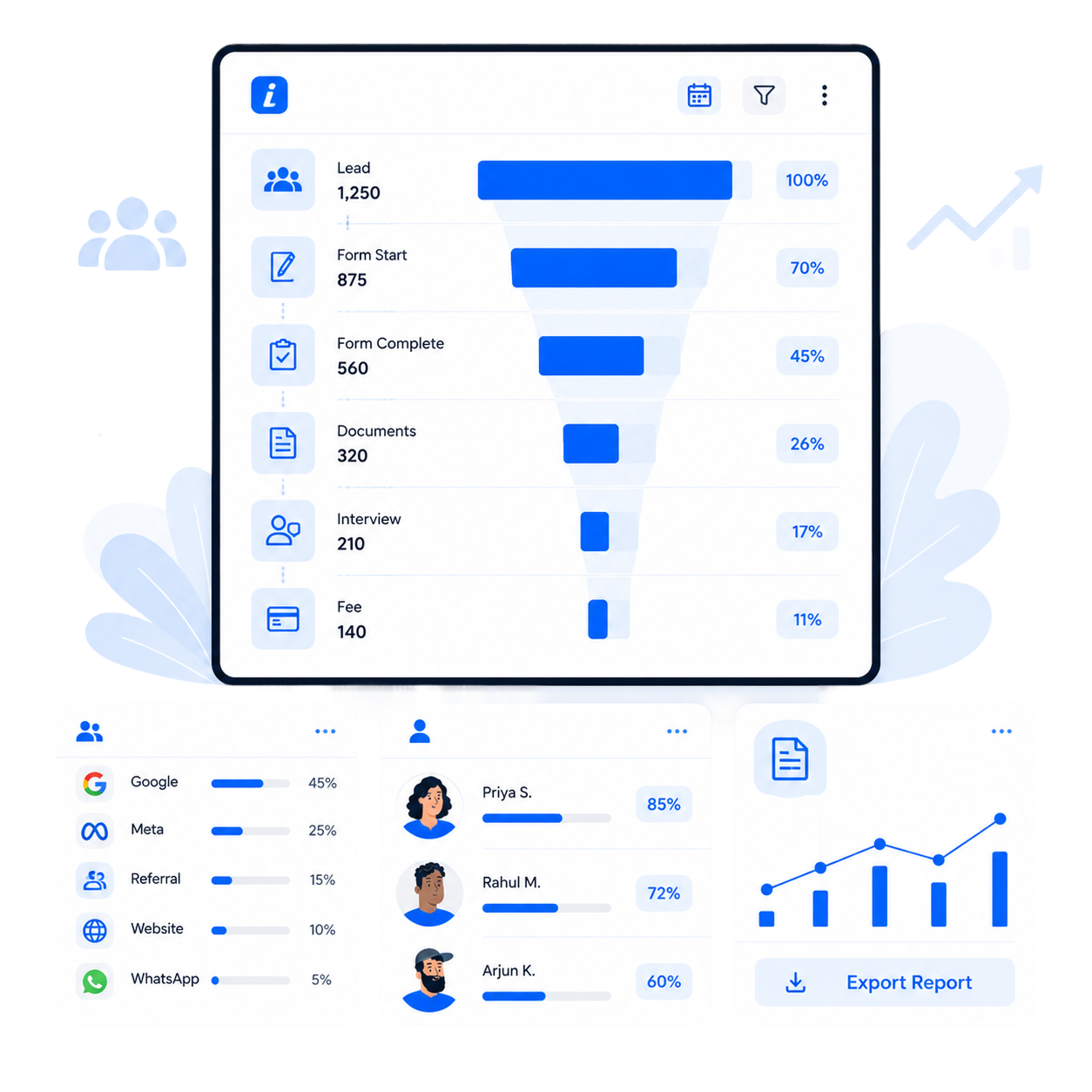
Track every candidate through a clear, colour-coded pipeline from first enquiry to admitted (or rejected).
ForSchool Admin Staff Super Admin
Every lead moves through a visible pipeline. Drag a candidate between stages on the board, or let status changes trigger automated WhatsApp messages.
| Stage | Meaning | Typical next action |
|---|---|---|
| Enquired | A new lead has arrived. | Score and prioritise. |
| Shortlisted | Scored and approved by a counsellor. | Send a WhatsApp + demo link. |
| Contacted | Outreach sent; awaiting response. | Nurture if it goes cold. |
| Admission-ready | Interest confirmed; documents verified. | Collect the application + interview. |
| Submitted | The application has been completed. | Review and decide. |
| Admitted | Offer accepted; the student joins. | Onboard into Nucleus. |
| Rejected | Declined or withdrawn. | Archive with a reason. |
- Kanban board view with drag-and-drop status updates.
- Bulk actions to move several candidates at once.
- Status-change automation (e.g. a WhatsApp template on shortlist).
- Internal notes that parents never see.
Stage analytics roll up across schools so you can compare admission health branch by branch.
Was this page helpful? QuickEnroll AI v1.8.0betaPage updated June 15, 2026