Instructions students can follow
Separate the learning goal, task steps, deliverables and submission expectations clearly.
Create an editable assignment brief with learning goal, student instructions, deliverables and a simple evaluation guide. Choose the class, subject, topic and time available; Orbit drafts the structure, while the teacher checks workload, accessibility, originality and curriculum fit.
Human-reviewed output · school-safe workflows
Orbit AI Assignment Generator drafts structured student work from a teacher’s class, subject, topic and learning goal. It can propose instructions, deliverables, checkpoints and evaluation criteria for homework or projects. Teachers should review the academic level, time demand, source expectations and accommodations before assigning the final version.
A topic alone is not an assignment. Students also need to know what to make, what evidence to include, how long to spend and how their work will be evaluated. When those details are missing, families interpret the task differently and teachers receive work that cannot be compared fairly. Orbit helps turn a learning goal into a complete first draft that can be adjusted for the class, available resources and school policy.
Separate the learning goal, task steps, deliverables and submission expectations clearly.
Add a time limit and available resources before the assignment is drafted.
Give students a concise view of what matters before they begin the work.
Give Orbit essential context. Review its structured output. Keep final teaching decisions with educator.
Describe what students should understand or demonstrate, not only the chapter name.
Add the time available, individual or group format, permitted sources and resource constraints.
Orbit drafts student instructions, deliverables, milestones and proposed evaluation criteria.
Edit the draft for accessibility, home-resource differences, academic integrity and the needs of your learners.
Teacher-designed task · Class 9 · Social Science
Illustrative one-week assignment brief with low-resource options, checkpoints and transparent criteria.
Teacher review stays essential. Check the draft for workload, resource equity, accessibility, safeguarding, originality expectations and alignment with your school’s assessment policy before publishing it.
Clear output, faster iteration and final educator control—the things that matter during a real school day.
Separate the learning goal, task steps, deliverables and submission expectations clearly.
Add a time limit and available resources before the assignment is drafted.
Give students a concise view of what matters before they begin the work.
Break longer work into proposal, evidence and submission stages rather than one distant deadline.
Draft low-resource or flexible routes, then tailor them to the actual support needs in the class.
Open Orbit AI to structure an assignment, or request a school demo to explore review and classroom workflows.
Easy reads about AI in classrooms, what makes great schools tick, and the cool tools we are building.
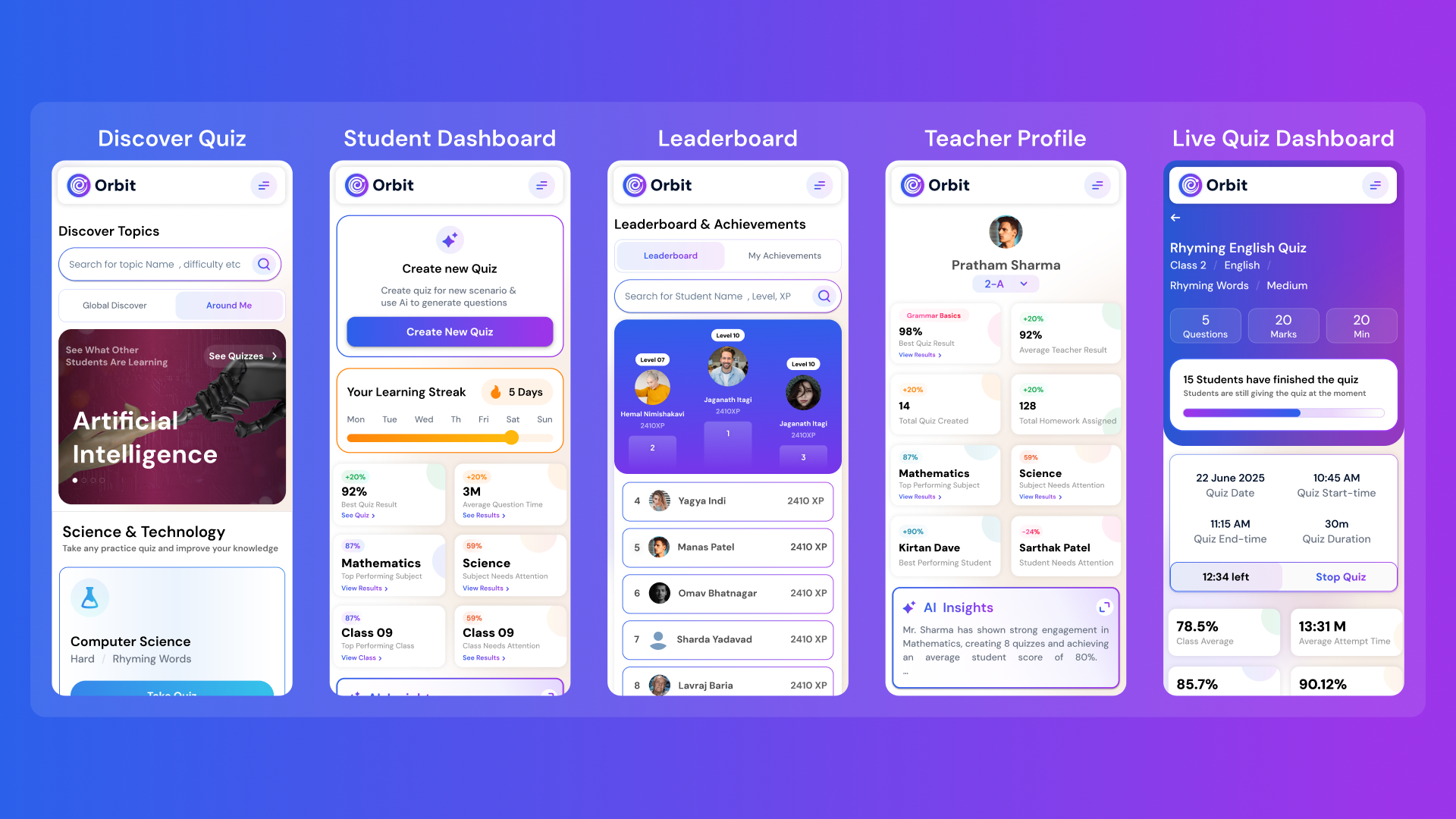
Orbit v1.4.7-beta brings a smarter and more personalized learning experience for students and teachers. With a new student dashboard, subject performance tracking, leaderboards, and real-time teacher analytics, Orbit makes learning interactive and data-driven.


From cutting attendance time to unlocking personalized learning, smart AI assistants are giving educators back what they’ve always needed most. The time to inspire. Discover why the future of education isn’t AI vs. Teachers, but AI + Teachers.

Taking attendance shouldn’t eat up your mornings. Discover how principals across India are cutting hours of wasted time and securing their campuses with Inforida’s Goood Morning — a biometric attendance system built for accuracy, safety, and peace of mind.
Everything you need to know about Inforida's platform, pricing, and implementation.
It drafts a structured assignment brief with a learning goal, student instructions, expected deliverables, suggested checkpoints and evaluation criteria based on teacher inputs.
Yes. Teachers can request a short homework task, investigation, presentation brief, field observation or longer project. The format and workload should be reviewed for the class.
Yes. Adding duration, device access, group size and material constraints helps Orbit draft a more practical brief. Teachers should still check home-resource fairness.
Orbit can propose concise criteria or a simple weighting. Treat these as a draft and ensure they match the learning goal and your school’s assessment policy.
Use local evidence, staged checkpoints, short reflections and in-class follow-up questions. State permitted assistance clearly and follow the school’s academic-integrity policy.
The teacher knows the taught content, learner needs, available resources and assessment rules. Review prevents unrealistic workload, exclusion, ambiguity and accidental misalignment.
Take attendance, collect fees, send messages and run the day, all from your phone. Made for school heads who are always on the move.