Face enrollment
Register student and staff faces so the gate can recognise them — by bulk photo upload or a live capture on the device.
ForSchool Admin Teacher
Enrollment teaches Goood Morning who’s who. You enrol once per person; the system stores an encrypted face embedding, never the raw photo.

Two ways to enroll
- Bulk photo upload — upload a folder of student/staff photos from the admin dashboard; the system builds an embedding for each.
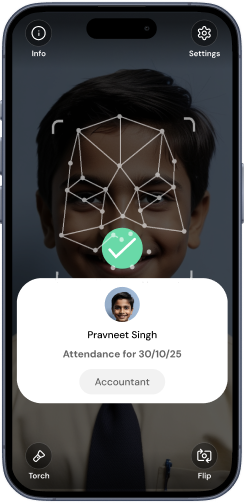
- Live capture — trigger enrolment from the dashboard and have the person look at the tablet for a one-tap capture (best when you have no photo or a poor one).
Enroll a student (live capture)
- 1Pick the personFrom the dashboard, choose a class and student (or a staff member) and tap Trigger face registration.
- 2Capture at the deviceThe tablet prompts “Look at the camera, hold still” and takes a live frame.
- 3ConfirmReview the match quality. The person is now ready for gate recognition.
If enrolment times out
A triggered enrolment stays open for about 5 minutes. If the device is slow or the network drops, the window expires — just re-trigger it from the dashboard.
A face already enrolled at a different school can’t be silently claimed — the system flags it. Re-enrol under your school if a student transferred in.
Good lighting and a straight, front-facing photo give the most reliable matches. Re-enrol if a student’s appearance changes a lot.
Was this page helpful? Goood Morning v3.1.0Page updated June 15, 2026